Testing, Deployment & Advanced Topics
Learn how to test your custom services, deploy them to production, and understand important restrictions.
Testing Your Custom Service
Before deploying to production, thoroughly test your code.
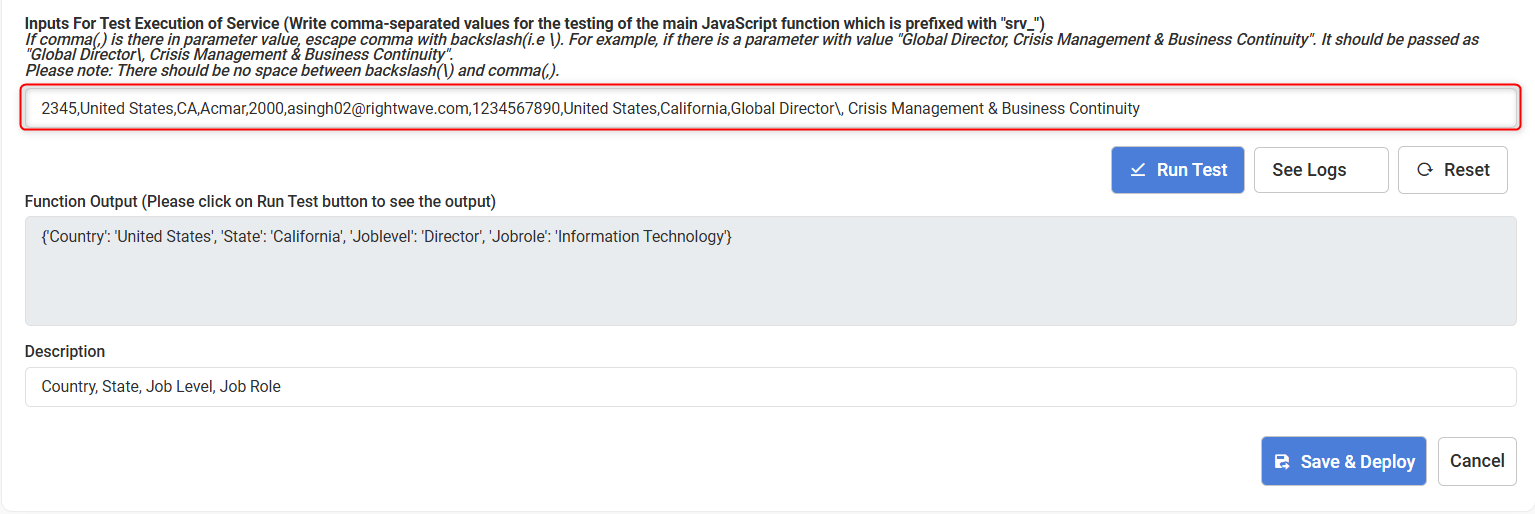
Providing Test Input
To test your custom service:
- Enter test parameters in the Test Input area
- Format: Comma-separated list of parameter values
- Execute test by clicking the Test button
Example:
India, Manager, 5
Handling Commas in Parameters
If any parameter value contains a comma, escape it with a backslash:
Global Director\, Crisis Management & Business Continuity, 10
Notice the backslash before the comma in "Global Director, Crisis Management & Business Continuity".
Important: There should be no space between the backslash and the comma.
Deployment Testing
Automatic testing: When you deploy a service to production, the system automatically runs all test cases.
Deployment condition: Your service will only be deployed if all test cases pass.
Process:
- Attempt deployment
- System runs test cases
- If all tests pass → Service deploys
- If any test fails → Deployment is blocked with error details
Deployment Status
Custom services have two primary deployment statuses:
Draft Status
When assigned: Upon creation or during development
Characteristics:
- ✅ Service is not deployed to production
- ✅ Can be modified and tested
- ✅ Isolated from production users
- ✅ Perfect for development and testing
Actions available:
- Edit code
- Run tests
- Deploy to production
Deployed Status
When assigned: After successful deployment to production
Characteristics:
- 🔒 Service is live and active
- 🔒 Error-free and tested
- 🔒 Used by production systems
- 🔒 Cannot be edited directly
To make changes:
- Create new Draft version
- Make modifications
- Test thoroughly
- Redeploy to production
The Production Script is the deployed version. To edit it, you must modify the Draft Script and redeploy.
Restricted Keywords
To ensure stability, security, and performance of custom services, certain JavaScript keywords are prohibited:
Forbidden Keywords
The following keywords are NOT allowed in custom service scripts:
// Restricted/Harmful keywords - DO NOT USE
process          // Node.js process object
setTimeout       // Asynchronous timing
setInterval      // Asynchronous timing
async            // Asynchronous functions
await            // Promise handling
eval             // Dynamic code evaluation
require          // Module loading
import           // ES6 imports
XMLHttpRequest   // Direct HTTP requests (use rdn.call instead)
Security & Stability: These keywords are restricted to prevent security vulnerabilities and ensure service stability. Attempting to use them will cause errors.
Recommended Cautions
While not strictly forbidden, avoid these for best results:
| Feature | Issue | Alternative |
|---|---|---|
| AJAX class | Can cause execution issues | Use rdn.call functions |
| Direct API calls | Avoid unless required | Use rdn.call.GET/POST/PUT |
| Nested functions | Reduces readability | Keep nesting shallow (2-3 levels max) |
| Arrow functions | Context binding issues | Use traditional function syntax |
Default Service
When you create an RDN account, a default custom service is automatically provided:
srv_standardize_country
Purpose: Standardize country names and formats
Use case: Ensures consistent country data across your system
Example:
function srv_standardize_country(countryInput) {
  // Converts various formats to standard format
  // e.g., "USA" → "United States"
  // "UK" → "United Kingdom"
}
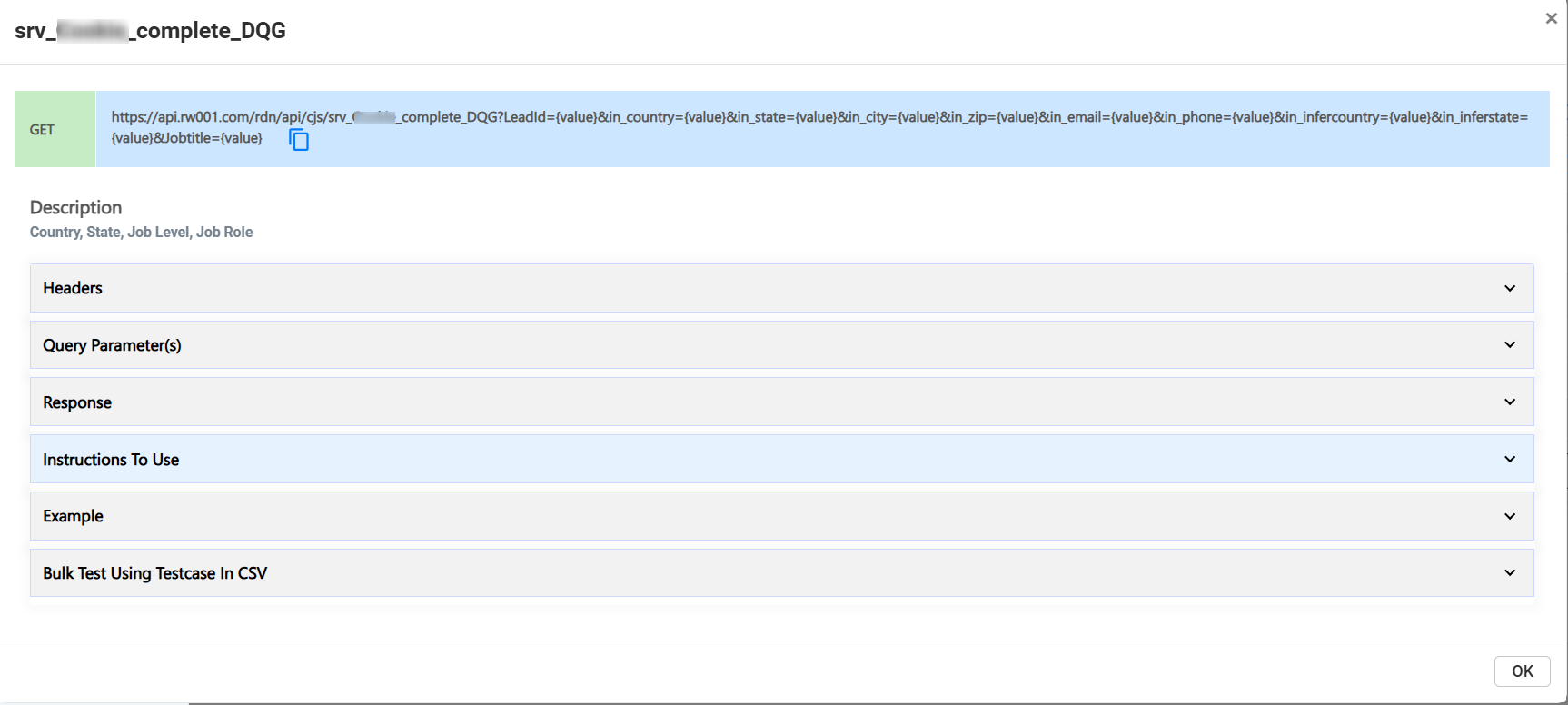
How to use: Reference this service as a template when building your own custom services.
Study the default service to understand RDN's design patterns and best practices!
Deployment Workflow
Follow this complete workflow for safe, reliable deployment:
Development Phase
├── 1. Create service in Draft mode
├── 2. Write initial code
├── 3. Test with simple inputs
├── 4. Review code and logic
└── 5. Fix any issues

Pre-Production Phase
├── 6. Write comprehensive test cases
├── 7. Test all code paths
├── 8. Test error scenarios
├── 9. Review logs and output
└── 10. Final code review

Deployment Phase
├── 11. Initiate deployment
├── 12. System runs automatic tests
├── 13. Verify all tests pass
├── 14. Service deployed to Production
└── 15. Service is now LIVE

Post-Deployment
├── 16. Monitor service execution
├── 17. Review production logs
├── 18. Verify performance
└── 19. Alert on failures
Testing Best Practices
Unit Testing
Test individual functions:
// Test basic operation
Input: "5, 3"
Expected: 8

// Test edge cases
Input: "0, 0"
Expected: 0

// Test negative numbers
Input: "-5, 3"
Expected: -2
Integration Testing
Test functions that call other services:
// Test API integration
Input: "valid-input"
Expected: Proper API response

// Test error handling
Input: "invalid-input"
Expected: Graceful error message
Error Testing
Test error conditions:
// Test null input
Input: ""
Expected: Error or default value

// Test invalid type
Input: "not-a-number"
Expected: Conversion error or handling
Deployment Checklist
Before deploying to production, verify:
- All test cases pass
- Code follows best practices
- No restricted keywords used
- Error handling implemented
- API calls have proper headers
- Input validation present
- Output format consistent
- Logging statements appropriate (not excessive)
- No sensitive data exposed in logs
- Performance is acceptable
- Documentation is clear
Troubleshooting Deployment
Deployment Fails with Test Errors
Problem: Tests fail during deployment Solution:
- Check test input format
- Review error messages in logs
- Fix code issues
- Re-test locally
- Retry deployment
Tests Pass Locally but Fail on Deployment
Problem: Different behavior in production Solution:
- Check for environment-specific issues
- Verify all input edge cases
- Review error handling
- Check API connectivity
- Review logs for details
Service Runs Slowly
Problem: Poor performance in production Solution:
- Optimize code (remove unnecessary operations)
- Cache frequently used data
- Use more efficient algorithms
- Check external API response times
- Review logs for bottlenecks
Monitoring & Maintenance
After deployment:
- Monitor execution - Check logs regularly
- Performance tracking - Monitor response times
- Error monitoring - Alert on failures
- Usage analysis - Track how often service is used
- Regular reviews - Audit code for improvements
Next Steps
- Review all documentation - Ensure you understand all concepts
- Create test services - Practice before production use
- Deploy with confidence - Your service is now live!
- Maintain code - Keep documentation and code updated
Congratulations! You're now ready to deploy custom services. Good luck! 🚀