Writing Custom Service Code
Learn how to write JavaScript code for your custom services using the integrated JS editor.
Main Function
Every custom service requires a main function as the entry point for your code.
Function Naming
The main function must follow these rules:
- Prefix required: Must start with
srv_ - Auto-prefixed: The system automatically adds
srv_prefix, so you don't need to add it manually - Unique name: The function name must be unique across your RDN instance
- Example: If you create a function named
addScore, it becomessrv_addScore()
You cannot have two functions with the same name (e.g., srv_addScore) in different custom services within the same instance.
Input Arguments
All input arguments to the main function are treated as strings by default.
Converting String to Numbers
If you need to perform numeric operations, convert strings to numbers first:
function srv_calculate(num1, num2) {
  // Convert string inputs to numbers
  const number1 = parseInt(num1);
  const number2 = parseInt(num2);

  // Now you can perform math operations
  return number1 + number2;
}
Use parseInt() for integers and parseFloat() for decimal numbers.
Example with Mixed Types
function srv_processData(name, age, score) {
  // name and score are strings (age might be too)
  const numAge = parseInt(age);
  const numScore = parseFloat(score);

  // Now you can use them in calculations
  return {
    name: name,
    isAdult: numAge >= 18,
    scaledScore: numScore * 1.5
  };
}
Code Organization
Simple Logic
For simple logic (no more than 10 lines), write it directly in the main function:
function srv_add(num1, num2) {
  return parseInt(num1) + parseInt(num2);
}
Complex Logic
For complex or large scripts, organize your code with helper functions:
// Main function
function srv_processLead(name, title, country) {
  const standardizedCountry = standardizeCountry(country);
  const category = categorizeTitle(title);

  return {
    name: name,
    country: standardizedCountry,
    category: category
  };
}

// Helper functions
function standardizeCountry(country) {
  // Logic to standardize country names
  return country.toUpperCase();
}

function categorizeTitle(title) {
  // Logic to categorize job titles
  if (title.includes("Manager")) {
    return "Management";
  }
  return "Other";
}
Return Types
Single Value Return
Return a single value using the return statement:
function srv_add(num1, num2) {
  return parseInt(num1) + parseInt(num2);
}
Input: srv_add(3, 2)
Output: 5

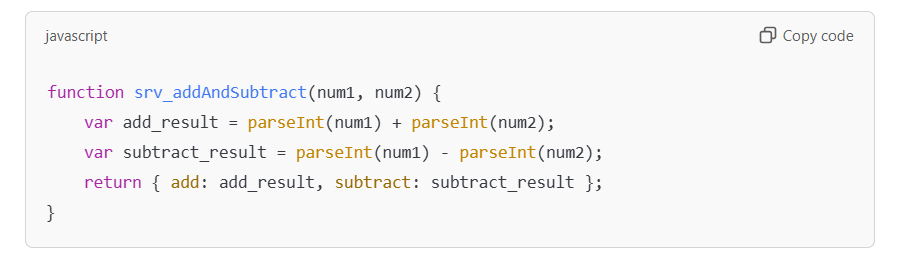
Multiple Values Return
For multiple values, package the output into a map (JavaScript object) and return it:
function srv_addAndSubtract(num1, num2) {
  const n1 = parseInt(num1);
  const n2 = parseInt(num2);

  return {
    sum: n1 + n2,
    difference: n1 - n2
  };
}
Input: srv_addAndSubtract(3, 2)
Output:
{
  "sum": 5,
  "difference": 1
}
Code Examples
Example 1: Data Transformation
function srv_formatContact(firstName, lastName, email) {
  return {
    fullName: firstName + " " + lastName,
    email: email.toLowerCase(),
    domain: email.split("@")[1]
  };
}
Example 2: Conditional Logic
function srv_calculateBonus(salary, performanceScore) {
  const sal = parseInt(salary);
  const score = parseFloat(performanceScore);

  let bonusPercentage = 0;
  if (score >= 90) {
    bonusPercentage = 0.20; // 20%
  } else if (score >= 80) {
    bonusPercentage = 0.15; // 15%
  } else if (score >= 70) {
    bonusPercentage = 0.10; // 10%
  }

  return {
    salary: sal,
    bonusPercentage: bonusPercentage * 100,
    bonusAmount: sal * bonusPercentage
  };
}
Example 3: Array Operations
function srv_findMaxValue(value1, value2, value3) {
  const values = [
    parseInt(value1),
    parseInt(value2),
    parseInt(value3)
  ];

  return {
    max: Math.max(...values),
    min: Math.min(...values),
    average: values.reduce((a, b) => a + b) / values.length
  };
}
Best Practices
Follow these best practices when writing custom service code:
- Convert types explicitly - Always convert string inputs before math operations
- Use meaningful names - Name functions and variables clearly
- Keep it modular - Use helper functions for complex logic
- Handle edge cases - Consider null, empty, or invalid inputs
- Return consistent types - Always return the same data structure
- Add comments - Explain complex logic for future reference
- Test thoroughly - Verify all code paths before deployment
Common Patterns
Input Validation
function srv_validateAge(age) {
  const numAge = parseInt(age);

  if (isNaN(numAge)) {
    return { valid: false, error: "Invalid age" };
  }

  return {
    valid: numAge >= 0 && numAge <= 150,
    age: numAge
  };
}
String Manipulation
function srv_processName(fullName) {
  const parts = fullName.trim().split(" ");

  return {
    firstName: parts[0],
    lastName: parts[parts.length - 1],
    initials: parts.map(p => p[0]).join(".")
  };
}
Nested Objects
function srv_structureEmployee(name, title, dept) {
  return {
    employee: {
      name: name,
      position: {
        title: title,
        department: dept
      }
    }
  };
}
Next Steps
- Learn about RDN functions - Use built-in utilities
- Test your code - Validate your logic
- Deploy to production - Go live with your service
Ready to add more functionality? Check out RDN Functions to learn about built-in helpers! 🔧